
Why is content king? We hear about it all the time. The answer is simple, content is a vital part of your website. If your content is not easy to understand and interpret, then you may easily lose your reader. The content of your website will make or break the experience, no matter how easy to use your website may be.
The first thing to consider while evaluating the copy you’ve written for your website is your audience. For example, on a blog I write about geckos, I tend to use gecko jargon such as ‘feeders’ (insects that geckos eat), ‘hatchlings’ (baby geckos), and ‘herps’ (which could be taken in a dirty sense, but it is short for reptiles and amphibians).
As I use these words in my writing, I have to consider whether or not it is appropriate for my audience. It is important to base your decision of using jargon on the knowledge level of the audience. The key is to know what audience you are trying to reach. If I was to target a general reptile audience, who may not know a specific gecko jargon based word, I would proceed to define it. However, if I was to address an audience who had no reptile experience, I would avoid using jargon words all together. In addition to knowing the audience, you need to know the spectrum of your audience. If a person interested in geckos, but does not own any yet, and lands on my blog, I want him to understand what he is reading just as easily as a professional breeder. If not, I am limiting my audience.
Overall, knowing your audience sets the stage for other approaches to writing usable content.
Abbreviations Are Too Technical
When you are writing your content, you want to avoid abbreviations. If you must use them, make sure that they are defined somewhere easy and accessible for those who are not familiar with them. Using abbreviations makes sense when extra space is needed. Even then, only commonly known abbreviations should be used.
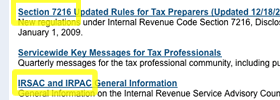
IRS.gov uses abbreviations on Tax Professional page
One example of this can be found on IRS.gov. Taxes can be a hassle for anyone without expertise in the field. Regulations are endless and stipulations are relentless. While browsing the IRS page for individuals you see very few abbreviations in the titles of each item available to users. If you navigate to the tax information for tax professionals it is a different story. Section 7216, IRSAC and IRPAC? What? The audience has changed on this page. Abbreviations are more prevalent because this page is tailored to meet the needs of people trained in this field.
Make Headers and the Paragraph’s 1st Sentence Descriptive
The first sentence of a paragraph is the most important. People scan content and there is no stopping that. That being said, the more complex and boring a sentence in your paragraph is, the less likely it is to be read. This is why headers and first sentences are so vital. The goal is to include the main idea of the paragraph while hooking your readers in the first sentence.
News websites are a great example of online content that is victim to constant scanning. CNN sets the tone for each paragraph of their news articles in the first sentence so that a reader can easily browse over an article and get the main ideas quickly. This method can be described as the “inverted pyramid” style of writing, which has the most important information at the top of the paragraph or story and the least important at the bottom.

CNN Articles highlight excellent first sentence usage.
Limit Length and Consider Reading Level
When writing, be sensitive of how long each section of content is growing. A lengthy paragraph can often be split up into several smaller ones. A good rule of thumb is to stick to about six sentences per paragraph. By splitting up large bodies of text, the readability and scan-ability is improved.
Another concept to consider is reading level. When Andrew, David and I discuss the article styles we write here on UX Booth, we commonly acknowledge that Andrew writes at a higher reading level than David or I commonly do. The combined style we use works, though. We understand that Andrew commonly writes to an audience who may have a more in depth understanding of our topic, while David and I balance things out by reaching other audiences easier. The variety in our posts fits our varied audience well.
One tool that I included in my 5 Web Accessibility Improvement Tools was a document readability analyzer. This is a neat tool that helps gauge what reading level you’re writing at.
Remember Basic Composition Lessons
For some of us Composition 101 and 102 were not too long ago. The basics that have been taught to you in your introductory English classes should apply to your content writing as well.
One prime example of this is the use of unnecessary exclamations. Luckily we’ve seen a decrease in the trend to TYPE IN ALL CAPS or overuse exclamation points. It has become standard that on the internet this implies that you are shouting. However, people often still abuse the exclamatory typing. It is seen as shouting, yet some still do not understand why its use should be moderated.
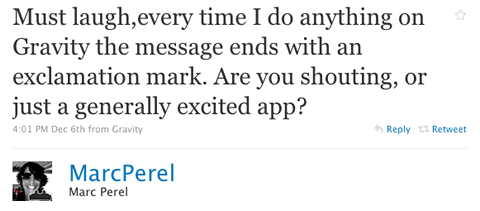
Marc Perel comments on application’s use of exclamation points.
In addition to writing in a calm, friendly manner by avoiding caps and punctuation abuse, be sure to write in an active voice. Studies have shown that content presented in passive voice are often read aloud in active voice. Make it easier on your users and write actively, just as you were required to do in school.
Summary and Conclusion
Writing user friendly content can be accomplished simply by following a few guidelines. After establishing who your audience is, writing for your audience is easy.
- Evaluate the experience level of the audience you’re writing to
- Avoid complex jargon and industry abbreviations unless addressing experts only
- Utilize headlines and first sentences of paragraphs to maximize potential for easy scanning
- Be concise and conscious of the reading level you present your content in
- Follow those rules you learned in English class about exclamation point abuse and writing in the active voice.